
Drop-in LiteLLM provider for OpenCode with zero configuration.








Auto-detect a running LiteLLM proxy, pull every model from /v1/models, and register them in OpenCode.
No model lists to hand-maintain. No restart loops. No surprises.
Quickstart · Configuration · How it works · FAQ · Contributing
npm package:
opencode-plugin-litellm· GitHub repo:yuseferi/opencode-litellmThe unscopedopencode-litellmnpm name was already taken by another author.
Maintaining a models block in opencode.json for every model your LiteLLM proxy exposes is a chore — every new entry in your model_list means a config edit, a restart, and a context-switch.
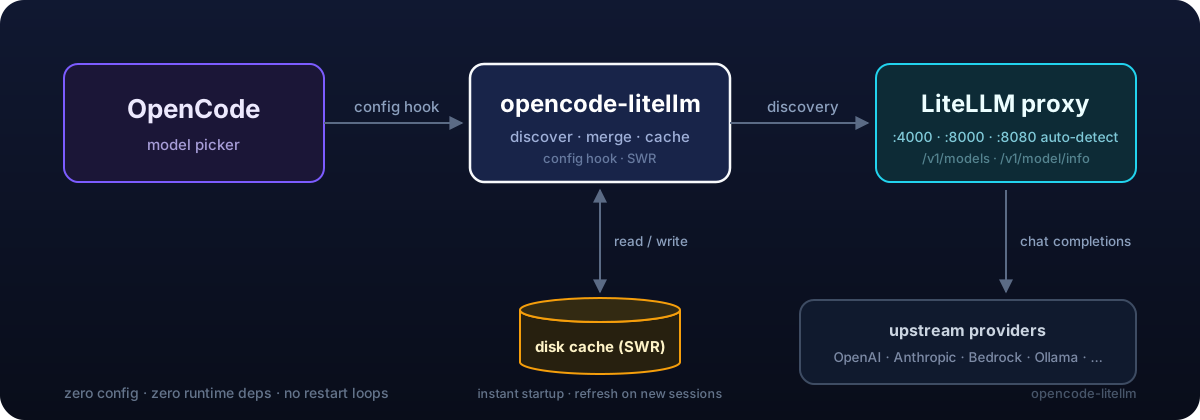
opencode-litellm removes that loop entirely. It hooks into OpenCode's config lifecycle, queries your LiteLLM proxy at startup, and merges the discovered models into your config in memory. The result: every model in litellm config.yaml shows up in OpenCode's picker the moment you start it — automatically.
# 2. Start LiteLLM (if it isn't already)
litellm --config config.yaml --port 4000

# 3. Run OpenCode — every model in your LiteLLM model_list is now available.
opencode| 🔍 Auto-detection | Probes localhost:4000, :8000, :8080 and adopts the first responsive proxy. |
| 📡 Dynamic discovery | Queries /v1/models so your OpenCode model picker always reflects your live model_list. |
| ⚡ Instant startup (SWR) | Discovered models are cached on disk and loaded synchronously — startup never blocks on the network. A background refresh on new sessions keeps the cache fresh; entries expire after 7 days. |
| 🏷️ Smart formatting | Turns anthropic/claude-3-5-sonnet into Claude 3.5 Sonnet in the picker — handles versions, sizes, quantizations, and brand-cased names like gpt-4o. |
| 🧠 Modality-aware | Enriches /v1/models entries with /v1/model/info (mode, token limits, capability flags) and hides embedding / image / audio models from the picker. |
| 💵 Real pricing | Maps input_cost_per_token / output_cost_per_token (and cache read/write costs) from /v1/model/info into OpenCode's cost field, so the picker and /cost show what the proxy actually bills instead of $0.00. Models LiteLLM has no price for are left unpriced, not falsely marked free. |
| 🧩 Reasoning-effort variants | When LiteLLM reports per-model effort support (supports_low_reasoning_effort, …), the plugin surfaces each level as a picker variant automatically. |
| 🔐 Auth-aware | Honours LITELLM_API_KEY / LITELLM_MASTER_KEY env vars, provider.litellm.options.apiKey, or the key you stored via OpenCode's /connect. |
| 🌐 Gateway-friendly | Supports customHeaders for proxies behind Cloudflare Access or other API gateways requiring extra HTTP headers. |
| ⏱️ Non-blocking startup | Health checks fail fast (3 s); discovery fetches are capped at 15 s for slow remote proxies. Repeat config-hook invocations are a no-op. |
| 🤝 Non-destructive merge | Only adds models you don't already have configured. Hand-curated entries are preserved verbatim. |
| 🪶 Zero runtime deps | Only depends on @opencode-ai/plugin. No build step, no bundler. |
| 🔒 TypeScript strict | Strict-mode compiled, fully typed public API. |
Point at your LiteLLM proxy — the plugin discovers all models automatically:
{
  "$schema": "https://opencode.ai/config.json",
  "plugin": ["opencode-plugin-litellm@latest"],
  "provider": {
    "litellm": {
      "npm": "@ai-sdk/openai-compatible",
      "options": {
        "baseURL": "http://localhost:4000/v1"
      }
    }
  }
}You do not need to list any models — the plugin still discovers them from /v1/models automatically. Use this form only when you need to point at a non-default URL or pass an API key:
{
  "$schema": "https://opencode.ai/config.json",
  "plugin": ["opencode-plugin-litellm@latest"],
  "provider": {
    "litellm": {
      "npm": "@ai-sdk/openai-compatible",
      "name": "LiteLLM (proxy)",
      "options": {
        "baseURL": "http://litellm.internal.example.com/v1",
        "apiKey": "{env:LITELLM_API_KEY}"
      }
    }
  }
}
That's the whole config — every model in your LiteLLM model_list will appear in the picker.
If your team routes model traffic through Tuning Engines for policy, traces,
approvals, and usage visibility, add it as an OpenAI-compatible upstream in
your LiteLLM config. The plugin will discover the alias from LiteLLM just like
any other model_list entry:
model_list:
  - model_name: te-gpt-5.4-mini
    litellm_params:
      model: openai/gpt-5.4-mini
      api_key: os.environ/TUNING_ENGINES_API_KEY
      api_base: https://api.tuningengines.com/v1
Then expose the key to LiteLLM and keep your OpenCode config pointed at the same LiteLLM proxy:
export TUNING_ENGINES_API_KEY=sk-te-...
litellm --config config.yaml --port 4000
opencode
OpenCode and this plugin still own model discovery and picker wiring. Tuning Engines sits on the upstream model route as the governed control plane.
If you want to rename a model in the picker, pin its organizationOwner, or otherwise hand-curate metadata, add it under models. The plugin preserves your entries verbatim and only injects discovered models whose key isn't already defined:
{
  "provider": {
    "litellm": {
      "options": {
        "baseURL": "http://litellm.internal.example.com/v1",
        "apiKey": "{env:LITELLM_API_KEY}"
      },
      "models": {
        "openai/gpt-4o": {
          "name": "GPT-4o (curated)",
          "organizationOwner": "openai"
        }
      }
    }
  }
}
Here, openai/gpt-4o keeps your custom name; every other model from the proxy is still discovered and added automatically.
All discovered models — reasoning-tier included — register under your single
LiteLLM provider and are invoked through /v1/chat/completions.
If LiteLLM reports per-model reasoning-effort support (e.g.
supports_low_reasoning_effort, supports_medium_reasoning_effort,
supports_high_reasoning_effort in model_info), the plugin automatically
surfaces those as OpenCode variants under the discovered model. Each variant
sets reasoningEffort to the reported level, so you can switch between
effort levels from the model picker without hand-curating every entry.
Note: OpenAI's reasoning-tier models (gpt-5, o1, o3, o4) reject requests that combine
reasoning_effortwith function tools on/v1/chat/completions. If you hit that error, fix it on the LiteLLM side — e.g. enable the Responses API for that model (use_responses_api: truein itslitellm_params) — or leavereasoningEffortunset for that model in OpenCode. See the FAQ entry below.
If your LiteLLM proxy requires a master key, expose it via either approach:
| Method | Example |
|---|---|
| Env var | export LITELLM_API_KEY=sk-... |
| Env var (alias) | export LITELLM_MASTER_KEY=sk-... |
| Config | "options": { "apiKey": "{env:LITELLM_API_KEY}" } |
OpenCode /connect |
Run /connect, search for your litellm provider entry, and paste the key |
The env var path lets you commit opencode.json without leaking secrets. The /connect path is useful when you'd rather manage the credential through OpenCode's own auth store (~/.local/share/opencode/auth.json) instead of an env var or config file — the plugin reads that file as a fallback and applies the stored key to its own health-check, model-discovery, and completion-time provider requests, so a key-only proxy works end to end.
If your LiteLLM proxy is behind Cloudflare Access or another gateway that requires extra HTTP headers, use the customHeaders option:
{
  "provider": {
    "litellm": {
      "options": {
        "baseURL": "https://litellm.internal.example.com/v1",
        "apiKey": "{env:LITELLM_API_KEY}",
        "customHeaders": {
          "CF-Access-Client-Id": "{env:CF_ACCESS_CLIENT_ID}",
          "CF-Access-Client-Secret": "{env:CF_ACCESS_CLIENT_SECRET}"
        }
      }
    }
  }
}
These headers are included in every request the plugin makes during model discovery (health check and /v1/models). To obtain a Cloudflare Access Service Token, follow the Cloudflare docs.
sequenceDiagram
    participant OC as OpenCode
    participant Plugin as opencode-litellm
    participant Cache as disk cache
    participant LL as LiteLLM proxy

    OC->>Plugin: config(initial)
    alt provider.litellm configured
        Plugin->>Plugin: use configured baseURL
    else not configured
        Plugin->>LL: probe :4000, :8000, :8080 (GET /v1/models, 3 s fail-fast)
        LL-->>Plugin: 200 OK on one
        Plugin->>Plugin: auto-create provider entry
    end
    Plugin->>Cache: read SWR cache (no network yet)
    alt cache hit
        Cache-->>Plugin: cached models
        Plugin->>OC: merge into provider.litellm (instant startup)
    else cache miss
        Plugin->>LL: GET /v1/models (with auth if set)
        Plugin->>LL: GET /v1/model/info (best-effort)
        LL-->>Plugin: { data: [...models] } + per-model info
        Plugin->>Plugin: enrich models, hide non-chat (embedding/image/audio)
        Plugin->>Plugin: format names, infer modalities + limits + pricing
        Plugin->>OC: merge into provider.litellm
        Plugin->>Cache: persist for next startup
    end
    Note over Plugin,Cache: on session.created, revalidate cache in<br/>the background (throttled to 5 min)
    OC->>OC: render model picker with all discovered models
- On OpenCode startup the
configlifecycle hook fires. - If
provider.litellmexists, itsbaseURLis used. Otherwise common ports are probed — that probe is the only health check (3 s fail-fast per port). - With a configured
baseURLthe proxy is not contacted during startup unless the cache is cold; the discovery fetch itself fails fast if the proxy is unreachable. - Fast path: if a fresh on-disk cache exists (≤ 7 days old), its models are merged in synchronously — startup never waits on the network.
- Cold path:
/v1/modelsand/v1/model/infoare fetched in parallel. Models are enriched with info metadata (mode, token limits, capability flags, per-token pricing —/v1/modelsomits these for database-defined models) and converted into OpenCode model entries with formattedname, inferredmodalities, andcost(USD/1M tokens, converted from LiteLLM's USD/token). Non-chat models (embedding / image / audio) are excluded from the picker. - Discovered models are merged on top of any user-defined ones — never overwriting them — and persisted to the cache.
- On every
session.createdevent the cache is revalidated in the background (throttled to once per 5 minutes); refreshed entries surface on the next OpenCode start. The whole cold path is capped by a 20 s timeout so a slow proxy never blocks boot.
- OpenCode ≥ 0.1.x with plugin support (
@opencode-ai/plugin ^1.14.0) - A running LiteLLM proxy:
pip install 'litellm[proxy]' litellm --config config.yaml --port 4000 - Node.js ≥ 20 (or Bun ≥ 1.0)
| LiteLLM version | OpenCode version | Status |
|---|---|---|
| ≥ 1.40 | ≥ 0.1.x | ✅ Tested |
| 1.30 – 1.39 | ≥ 0.1.x | /v1/models schema) |
| < 1.30 | any | ❌ Unsupported |
Why doesn't a model appear in OpenCode after I add it to LiteLLM?
Once LiteLLM exposes the model (restart or hot-reload LiteLLM if you edited
its config.yaml), the plugin picks it up automatically: whenever you open a
new session (and at most every 5 minutes), it re-queries the proxy and
updates the on-disk cache. The new model appears on your next OpenCode
start — no OpenCode config change needed. To force an immediate refetch,
delete the cache directory (~/.cache/opencode-litellm/, or
$XDG_CACHE_HOME/opencode-litellm/).
Can I use this with a remote LiteLLM proxy?
Yes. Set provider.litellm.options.baseURL to your remote URL and (optionally) apiKey. Auto-detection only probes localhost, but explicit configuration works against any URL.
What happens if LiteLLM is offline at startup?
OpenCode starts normally either way. With a warm on-disk cache, the previously discovered models are served from the cache — no network call — so the picker works as usual; only the background refresh is skipped until the proxy is back. With a cold cache (first run, or after the 7-day expiry), the plugin logs a warning and you won't see LiteLLM-discovered models until the proxy is reachable again.
Will my hand-curated model entries be overwritten?
No. The merge is additive: anything you've already defined under provider.litellm.models is preserved exactly as-is. Discovered models are only added if their key isn't already present.
Why is the npm name opencode-plugin-litellm and not opencode-litellm?
The unscoped opencode-litellm was already published by another author when this project was started. The GitHub repo and exported plugin symbol still use the cleaner opencode-litellm name.
Does this work with Ollama through LiteLLM?
Yes — anything in your LiteLLM model_list shows up, including Ollama, Bedrock, Azure, OpenAI, Anthropic, Google, etc. That's the whole point of LiteLLM.
My LiteLLM proxy is behind Cloudflare Access — how do I authenticate?
Cloudflare Access intercepts requests before they reach LiteLLM, so a plain Authorization: Bearer header isn't enough. Create a Cloudflare Access Service Token and pass the credentials via customHeaders:
{
  "provider": {
    "litellm": {
      "options": {
        "baseURL": "https://litellm.your-company.com/v1",
        "customHeaders": {
          "CF-Access-Client-Id": "{env:CF_ACCESS_CLIENT_ID}",
          "CF-Access-Client-Secret": "{env:CF_ACCESS_CLIENT_SECRET}"
        }
      }
    }
  }
}
The customHeaders map works for any gateway that requires extra HTTP headers — not just Cloudflare.
I get Function tools with reasoning_effort are not supported … in /v1/chat/completions — what do I do?
This error comes from OpenAI: their reasoning-tier models (gpt-5, o1, o3, o4) refuse function-tool calls on /v1/chat/completions when reasoning_effort is set. The plugin registers every discovered model through the chat-completions path, so fix this on the LiteLLM side:
- Enable the Responses API for that model in your LiteLLM config (e.g.
use_responses_api: truein itslitellm_params), or - Leave the model's
reasoningEffortunset in OpenCode (don't pick a reasoning-effort variant for it).
If your model id doesn't look like a reasoning model to LiteLLM (e.g. you renamed it), also check that its model_info in litellm config.yaml carries the right supports_* flags.
git clone https://github.com/yuseferi/opencode-litellm.git
cd opencode-litellm
npm install
npm run typecheck
npm test
The project is intentionally tiny:
src/
├── index.ts                    # Public exports
├── types/index.ts              # LiteLLM API types
├── utils/
│   ├── litellm-api.ts          # health check, discovery (/v1/models + /v1/model/info), auto-detect
│   ├── format-model-name.ts    # name formatting, categorization
│   ├── model-cache.ts          # stale-while-revalidate on-disk model cache
│   └── opencode-auth.ts        # fallback to OpenCode's /connect-stored credentials
└── plugin/
    └── index.ts                # LiteLLMPlugin entry (config hook, enrichment, filtering)

test/                           # vitest suite for the pure logic
See CONTRIBUTING.md for the full contributor workflow.
- Optional cost/latency overlay using LiteLLM's
/spendand/healthendpoints -
chat.paramshook for injecting LiteLLM routing tags / fallbacks
Have an idea? Open an issue.
Inspired by opencode-lmstudio by @agustif — the architectural blueprint for OpenCode model-discovery plugins.
Built on top of LiteLLM by the BerriAI team and OpenCode by the OpenCode contributors.
If this project saved you time, consider giving it a ⭐ on GitHub.