Update Plane AI page#450
Conversation


|
The latest updates on your projects. Learn more about Vercel for GitHub.
|




|
No actionable comments were generated in the recent review. 🎉 ℹ️ Recent review info⚙️ Run configurationConfiguration used: defaults Review profile: CHILL Plan: Pro Run ID: 📒 Files selected for processing (3)
✅ Files skipped from review due to trivial changes (2)
🚧 Files skipped from review as they are similar to previous changes (1)
📝 WalkthroughWalkthroughAdds a new, expanded Plane AI documentation page, replaces content in the old pi-chat doc, updates the VitePress sidebar link to ChangesPlane AI docs + routing
Estimated Code Review Effort🎯 2 (Simple) | ⏱️ ~10 minutes Suggested reviewers
Poem
🚥 Pre-merge checks | ✅ 4 | ❌ 1❌ Failed checks (1 inconclusive)
✅ Passed checks (4 passed)
✏️ Tip: You can configure your own custom pre-merge checks in the settings. ✨ Finishing Touches📝 Generate docstrings
🧪 Generate unit tests (beta)
Thanks for using CodeRabbit! It's free for OSS, and your support helps us grow. If you like it, consider giving us a shout-out. Comment |


There was a problem hiding this comment.
Pull request overview
Expands the Plane AI documentation page to describe the product’s AI surfaces, supported LLM providers/model selection, and how AI Chat works/modes.
Changes:
- Replaces the brief intro with a more detailed description of Plane AI capabilities and interaction surfaces.
- Adds sections for LLM providers/model selection and a deeper explanation of AI Chat internals and chat modes.
- Updates the self-hosted caution callout copy/title.
💡 Add Copilot custom instructions for smarter, more guided reviews. Learn how to get started.
|
|
||
| > [!CAUTION] Plane self-hosted instances | ||
| > [!CAUTION] Self-hosted Commercial Edition | ||
| > If you're running a self-hosted instance of Plane, you'll need to first configure Plane AI services to get it working. Follow this [setup guide](https://developers.plane.so/self-hosting/govern/plane-ai) first to use Plane AI. |
| Plane AI spans four interaction surfaces: | ||
|
|
||
| - **AI Chat** - a persistent, conversational assistant that lives in a sidebar and knows your workspace context. | ||
| - **Writing Assistant** - AI actions embedded in the work item and page editor: rephrase, simplify, elaborate, summarize, adjust tone. | ||
| - **AI blocks** - generative content blocks you insert into pages, each powered by a separate AI generation that can be revised independently. | ||
|
|
| reasoning block with a live to-do list of the AI's working steps (see Reasoning blocks | ||
| below). |
|
|
||
|
|
||
|
|
||
|
|
||
|
|
||
|
|
||
|
|
||
|
|
||
|
|
||
| ------------------- |
![coderabbitai[bot]](https://avatars.githubusercontent.com/in/347564?s=60&v=4)

There was a problem hiding this comment.
Actionable comments posted: 1
Caution
Some comments are outside the diff and can’t be posted inline due to platform limitations.
⚠️ Outside diff range comments (1)
docs/ai/pi-chat.md (1)
1-646:⚠️ Potential issue | 🔴 Critical | ⚡ Quick winCI formatting check failed - run pnpm fix:format before committing.
The oxfmt formatting check is failing in CI. As per coding guidelines, formatting is enforced and the CI check must pass before merge.
Run the following command to fix:
pnpm fix:format🤖 Prompt for AI Agents
Verify each finding against current code. Fix only still-valid issues, skip the
rest with a brief reason, keep changes minimal, and validate.

In `@docs/ai/pi-chat.md` around lines 1 - 646, The CI oxfmt formatting check is
failing for the updated documentation (see the "# Plane AI" and the new "## Turn
off Plane AI for your workspace" section in pi-chat.md); run the repo formatter
and reapply the formatting by executing the project formatter (pnpm fix:format),
review the formatted changes in docs/ai/pi-chat.md, stage the updated file, and
recommit/push so the CI formatting check passes.
🤖 Prompt for all review comments with AI agents
Verify each finding against current code. Fix only still-valid issues, skip the
rest with a brief reason, keep changes minimal, and validate.

Inline comments:
In `@docs/ai/pi-chat.md`:
- Around line 15-20: The document states "Plane AI spans four interaction
surfaces" but only lists three bullets ("AI Chat", "Writing Assistant", "AI
blocks"); either update the heading to "three interaction surfaces" or add the
missing fourth surface (likely the "Slack agent") as a fourth bullet. Locate the
phrase "Plane AI spans four interaction surfaces" and the bullets for "AI Chat",
"Writing Assistant", and "AI blocks" and adjust the copy to be internally
consistent by changing the count or inserting a fourth item named "Slack agent"
(or another confirmed surface).

---

Outside diff comments:
In `@docs/ai/pi-chat.md`:
- Around line 1-646: The CI oxfmt formatting check is failing for the updated
documentation (see the "# Plane AI" and the new "## Turn off Plane AI for your
workspace" section in pi-chat.md); run the repo formatter and reapply the
formatting by executing the project formatter (pnpm fix:format), review the
formatted changes in docs/ai/pi-chat.md, stage the updated file, and
recommit/push so the CI formatting check passes.
🪄 Autofix (Beta)
Fix all unresolved CodeRabbit comments on this PR:
- Push a commit to this branch (recommended)
- Create a new PR with the fixes
There was a problem hiding this comment.
Actionable comments posted: 1
🧹 Nitpick comments (1)
docs/ai/plane-ai.md (1)
479-481: ⚡ Quick winRemove or populate the empty subsection heading.
### Available providers and modelsis currently an empty section and is immediately followed by another heading, which makes the page structure confusing.🤖 Prompt for AI Agents
Verify each finding against current code. Fix only still-valid issues, skip the
rest with a brief reason, keep changes minimal, and validate.

In `@docs/ai/plane-ai.md` around lines 479 - 481, Remove or populate the empty
subsection heading "### Available providers and models" in the
docs/ai/plane-ai.md file: either delete that heading if no content is needed, or
add the intended content (e.g., list of providers and supported models,
configuration notes and examples) under the "### Available providers and models"
heading so it is not immediately followed by "### Semantic search and the
embedding model" and the document structure remains clear.
🤖 Prompt for all review comments with AI agents
Verify each finding against current code. Fix only still-valid issues, skip the
rest with a brief reason, keep changes minimal, and validate.

Inline comments:
In `@docs/ai/plane-ai.md`:
- Line 283: Update the broken MCP connector links by replacing the dead target
"/plane-ai/mcp-connectors" with the correct route "/ai/mcp-connectors" in the
document so both occurrences (the link at "See [MCP
connectors](/plane-ai/mcp-connectors)..." and the second instance referenced in
the comment) point to "/ai/mcp-connectors"; ensure the link text remains
unchanged and run the VitePress build to confirm the CI failure is resolved.

---

Nitpick comments:
In `@docs/ai/plane-ai.md`:
- Around line 479-481: Remove or populate the empty subsection heading "###
Available providers and models" in the docs/ai/plane-ai.md file: either delete
that heading if no content is needed, or add the intended content (e.g., list of
providers and supported models, configuration notes and examples) under the "###
Available providers and models" heading so it is not immediately followed by
"### Semantic search and the embedding model" and the document structure remains
clear.
🪄 Autofix (Beta)
Fix all unresolved CodeRabbit comments on this PR:
- Push a commit to this branch (recommended)
- Create a new PR with the fixes
ℹ️ Review info
⚙️ Run configuration
Configuration used: defaults
Review profile: CHILL
Plan: Pro
Run ID: ebb6f671-11c8-4b39-bbec-579900515622
📒 Files selected for processing (4)
docs/.vitepress/config.tsdocs/ai/pi-chat.mddocs/ai/plane-ai.mdvercel.json
💤 Files with no reviewable changes (1)
- docs/ai/pi-chat.md
✅ Files skipped from review due to trivial changes (1)
- docs/.vitepress/config.ts


|
|
||
|  | ||
|
|
||
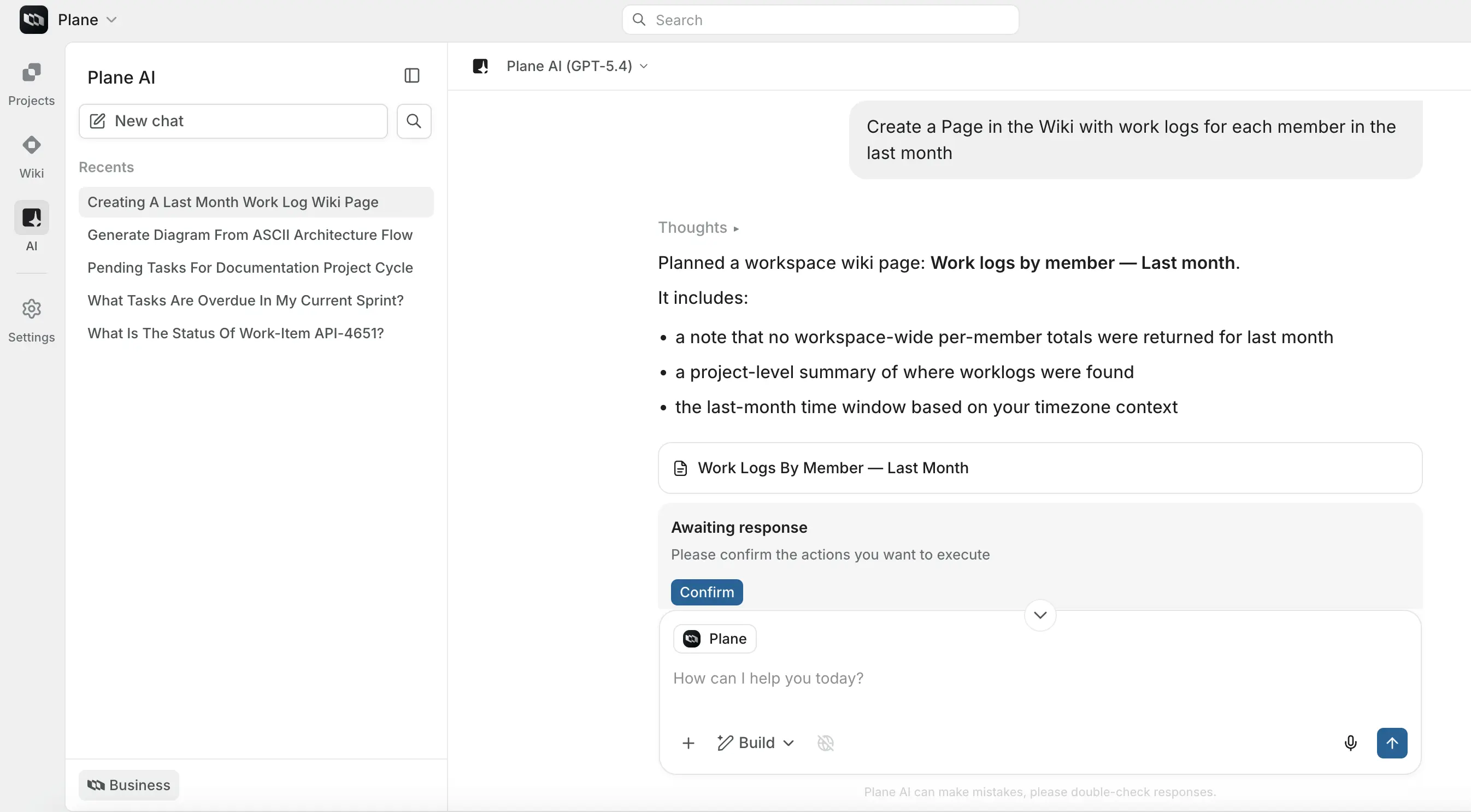
| Plane AI understands your workspace - work items, projects, cycles, modules, members, pages, comments, and more. When you ask something or give it a task, it draws from your actual data, not generic knowledge. It can also search the web and connect to external tools like GitHub and Slack through MCP connectors. |

There was a problem hiding this comment.
Slack is not yet available through MCP connectors. Replace it with Posthog or Granola
| - "Which issues are In Progress but have no assignee?" | ||
| - "What's blocking the API migration?" | ||
| - "Who is working on the most issues right now?" | ||
| - "Summarize the onboarding module" |
There was a problem hiding this comment.
- in
What did the team ship last week?, team is ambiguous because Plane doesn't know your team. It can only guess. - This
What's blocking the API migration?would work better if we use the specific entity reference - project, module or cycle
|
|
||
| ### Suggestion tiles | ||
|
|
||
| When you open a new chat, a **Suggestions** section appears in the conversation area with a list of prompt ideas. These are fetched dynamically from Plane AI based on the current context - the active mode, the workspace, and which project or entity you're focused on. Click any suggestion to send it as your first message. All suggestions are disabled while Plane AI is generating a response. |
There was a problem hiding this comment.
`dynamic' prompt suggestions are not yet implemented. We will soon, though!
| - States | ||
| - Issue views | ||
| - Teamspaces | ||
| - Initiatives |
There was a problem hiding this comment.
Users and labels are not there in the mentions options, yet
| - Create relationships between work items: duplicate, related, blocking, blocked by, and more | ||
| - Add or remove subscribers | ||
| - Apply custom properties | ||
| - Upload and attach files |
| - Add comments | ||
| - Log time worked (worklogs) | ||
| - Create relationships between work items: duplicate, related, blocking, blocked by, and more | ||
| - Add or remove subscribers |
|
|
||
| **Pages** | ||
|
|
||
| - Create new pages or nested pages in any project |
|
|
||
| 1. Describe what you want: "Create three sub-work items under PROJ-45 for the auth redesign - one for the login screen, one for token refresh logic, and one for session expiry handling." | ||
| 2. Plane AI plans the actions and shows them as action cards. Each card shows the action type, key details, and what will be created or changed. | ||
| 3. Review the plan. Edit individual cards if something looks wrong. Cancel any action you don't want. |
There was a problem hiding this comment.
Cancelling individual cards/actions in a plan is not yet supported. But its one of the things in immediate pipeline
|
|
||
| Connectors are only available in Build and Autopilot modes. | ||
|
|
||
| This restriction matches the purpose of each mode. Ask mode is read-only by design - adding action-capable connectors to it would break that guarantee. MCP connectors are fundamentally about doing things: posting to Slack, creating a GitHub issue, querying a customer record. Those are actions, not lookups, and they belong in the modes that are designed for action with the appropriate level of oversight. |
There was a problem hiding this comment.
replace Slack with one of our supported connectors
|
|
||
| ### The AI prompt input (page sidecar agent) <Badge type="tip" text="Business" /> | ||
|
|
||
| The page editor includes an AI prompt input at the bottom of the editor. It shows a text field labeled **"Ask AI to edit this page…"** with the active model name. Type a free-form instruction describing what you want done to the page - for example: |
There was a problem hiding this comment.
This bottom floater to take input is removed. Now all instruction should be given from AI Assistant sidecar


Description
Type of Change
Screenshots and Media (if applicable)
Test Scenarios
References
Summary by CodeRabbit