
Your data model, in your repo.
Design visually. Build with AI. Review alongside your code.



Install for VS Code • Open VSX (VSCodium, Cursor, Windsurf) • Free to use, source available
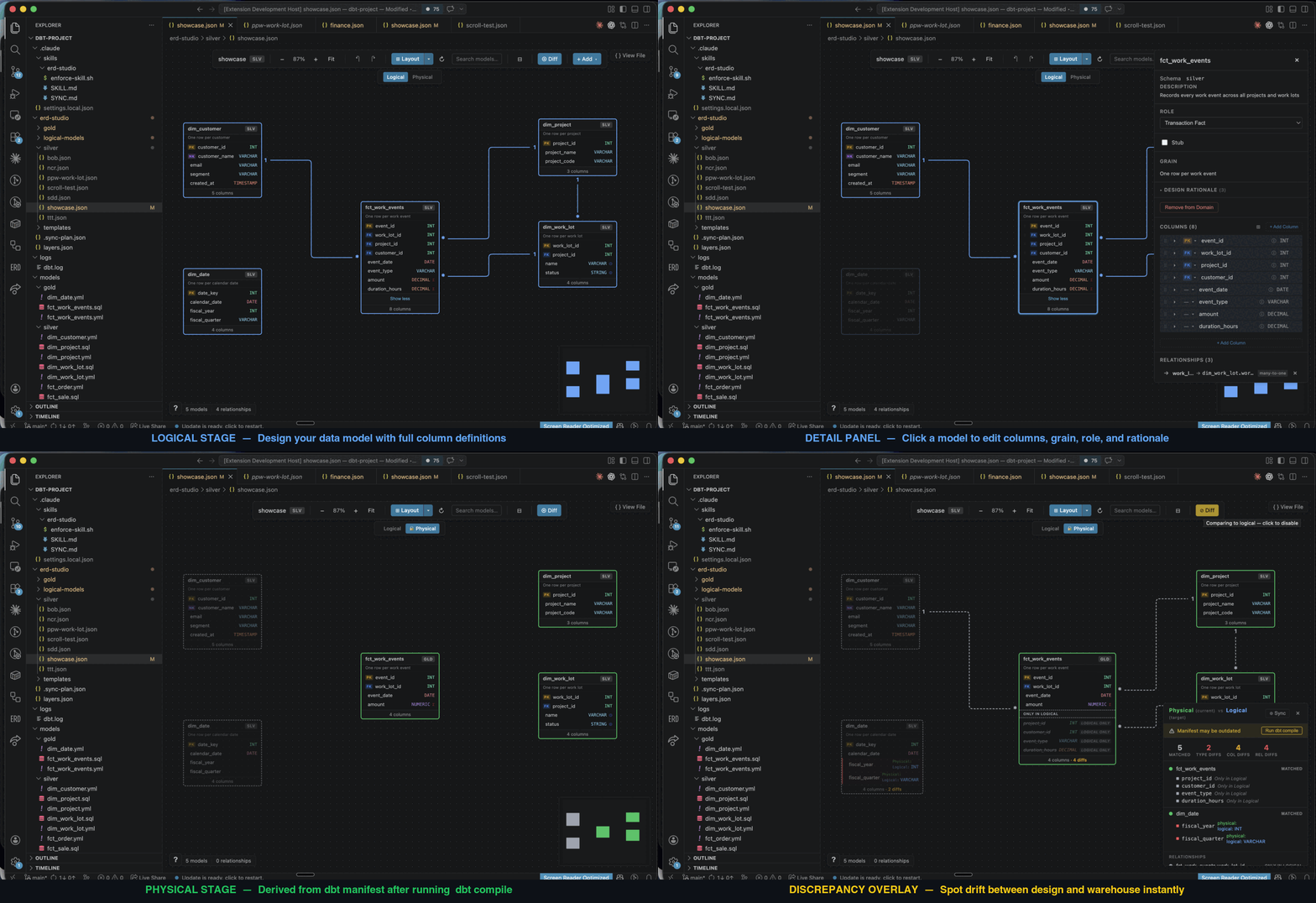
ERD Studio brings visual data modelling into VS Code. Keep your diagrams and design decisions in your code repo, give your AI assistant the context to build from them, and review design changes alongside the SQL.
- Give AI a design to build from. Capture grain, keys, relationships, and the reasoning behind them. Your assistant can use that context to draft dbt models and tests.
- Review the model before the SQL. Design on the canvas or ask your AI to propose a schema, then inspect and refine it visually.
- See where design and dbt disagree. Compare your logical model with your dbt schema and manifest. Missing columns, type differences, and relationship mismatches appear on the canvas. Generate a sync plan for your assistant to apply the changes you choose.
- Keep design and code in one review. Commit both in the same pull request, with readable diffs and a shared history.
- Run a whole domain together. Automatically generated dbt selectors let you build the models in a diagram with one command.
Traditional ERD tools such as erwin store models in application-specific files or a separate modelling repository. ERD Studio's plain files fit directly into your branches, pull requests, and AI workflow. Less setup, fewer handoffs, and no export step to give your AI the design.
The whole logical model is just two kinds of file: one YAML per model, one JSON per diagram. ERD Studio reads them and renders the canvas.

Edit on the canvas and those same files update. Edit them yourself or with AI and the canvas updates. Models are shared across diagrams, and everything stays in Git. No ERD Studio account, database, or server required.
The Physical view, the green canvas above, has no file of its own. It reads three files, and only the first is required: your schema YAMLs, always on disk, so the view works before you have ever run dbt; manifest.json after a dbt run; and catalog.json after dbt docs generate — the only one of the three that has seen your warehouse.
Each model shows where its shape came from, so a varchar on the canvas is never a guess: types are read from the warehouse when the catalog is there, otherwise from the data_type: you wrote, otherwise left blank rather than invented. A greyed-out model means it is genuinely not in your dbt project, not that you have not run dbt lately. And the edges are the tests you already run — relationships for the links, unique for the cardinality — so the canvas shows what dbt enforces rather than a second copy that can drift. Nothing is ever written to disk.
dbt is the only stack ERD Studio can read today. If you model somewhere else, contribute an integration or propose one — your logical model files stay exactly as they are as support grows.
Requires VS Code 1.85+ and a project containing dbt_project.yml (see logical-only setup). The Physical view needs nothing beyond your dbt schema YAMLs, and gets richer once manifest.json and catalog.json exist.
- Install ERD Studio and open your project in VS Code.
- Click the ERD Studio icon in the Activity Bar, choose Set Up ERD Studio, and follow the prompts to create your first domain (a diagram).
- Design models on the canvas, or add existing dbt models. If you use dbt, switch between Logical and Physical to compare your design with it.
- To work with AI, run ERD Studio: Install AI Coding Harness from the Command Palette. It adds project instructions for Claude Code, GitHub Copilot, Gemini, or Codex.
Then try asking your assistant:
Read my source models and propose a star schema for orders in ERD Studio. Include grain, keys, and design rationale. Let me review the diagram before generating dbt code.
Use ERD Studio for your logical models: design tables, relationships, and business rules without installing or running dbt.
For now, add a dbt_project.yml file containing name: logical_models to your project root and reload VS Code. The extension still uses that file to recognise the project; no dbt build or warehouse connection is needed for logical modelling.
Physical comparison needs dbt, so the canvas stays on the Logical stage — everything else works unchanged.
File format reference · Release notes · Send feedback · Contribute on GitHub
Free to use under the PolyForm Shield License 1.0.0: use it, modify it and share it, at home or at work, for any purpose except offering a product that competes with ERD Studio. The source is public; only the author may sell it or relicense it.